Think Database even when Spreadsheeting

Despite my preference for R over Excel, I still use a spreadsheet for many applications. But I find spreadsheets are often misused, or poorly constructed, and can create work later that can exceed the time and effort they might have saved you in the beginning. One way to prevent this is to think database when you are spreadsheeting.

An Excel spreadsheet is not a database and shouldn’t be thought of one, even if the two words are used interchangeably by people like, say, upper management (if your organization is anything like mine). But if you are doing anything with a lot of rows or columns of data, it is always a good idea to construct the spreadsheet as if it were a database. This at least gives you a chance that you will be able to add or extract data from the spreadsheet.

For example, we routinely receive large spreadsheets of thousands of rows long that are, outside of the bounds of the spreadsheet format, almost useless. The addition of fancy titles, merged cells, subtotals, empty rows, and other spreadsheet junk that disrupts the data makes extracting the data tedious at best and nearly impossible at worst. It would have been so much more useful had the author made one sheet hold the data—one header row with unique field names and just the raw data below, one record per row—and one sheet holding the spreadsheet math to provide the summary and calculated information. This is actually easier to construct and doesn’t lock the data in the spreadsheet.  It is easy enough to export the raw data as a dbf or comma delimited file to work on it in a proper database program or just use the data without relying on the Excel structure.

I know there is a temptation there to add the spreadsheet junk.  Pretty colors, lines, comment blocks, font changes, etc. are fine for that sheet that does the calcs (even if all that is usually a waste of time), just don’t let the junk get in the way of the data.  That’s the important stuff.

What do you think?  Drop us a comment.
Design in Engineering or vice versa?

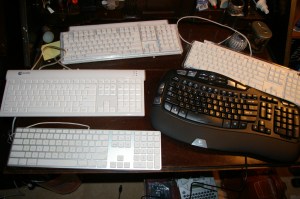
Okay, so maybe design isn’t always considered part of engineering, but it can have the same implications so I may, like today, talk about it.  I’m looking at five keyboards for my iMac piled up in the corner of my office.  They all work, they all put characters on the screen, and a couple of them (those from the design people at Apple) are gorgeous to look at.  So why are they all there in a pile and what am I using to write this post?

IMGP0007

Because I don’t like them.  Not from an engineering perspective–they all do what they were designed to do–but from a design point of view.  And that spells the difference between something being functional and something being functional and satisfying, pleasurable, and fun.  Of course the important thing is the concentration of the design effort.  The keyboard that came with this iMac is a slim, aluminum piece of art that actually works pretty well if you were raised on the flat keyboards of laptops that have little movement and very little “action”.  There is no doubt that it looks fantastic sitting in front of the big screen iMac, but after a while it just wears on your fingertips and I get annoyed how easily you can slip off the home keys and suddenly br dsuomh dp (you get the picture).  So that thing was designed for beauty and for younger hands, I guess.

The next was a non-Apple keyboard that had the flat keys but better action.  This one didn’t last long on my desk for the same feedback problem and lack of key travel.  Looked nice, though, and was perfectly fine for occasional typing, but not for a book or anything.

Then comes one that is almost as nice looking, but with real keys and some action.  This one came with my old lamp iMac and it was pretty good for a while.  But it didn’t provide much feedback and I got tired of it.  Could be I’m just fickle, I guess.  The next looked almost like that one but it was far more expensive and was touted as the best keyboard because of the spring mechanism and the old clicky sound (Matias).  It was better and I liked the feedback and the action.  Except that at some point the key would suddenly bottom out and this didn’t do much for long term, reliable typing.  So this one was less of the pretty and more for the functional — a better balance of function and design.

The penultimate one (are you sensing the dramatic buildup?) was a Logitech wave keyboard that was more suited for a PC than a Mac.  But it worked fine and I actually liked the more ergonomic keyboard shape.  Too bad the key action isn’t great and the travel of the keys is shallow.  But it suited for a while and I thought it was a good buy. It managed to look okay and do a good job, so the balance between design and function was pretty good.

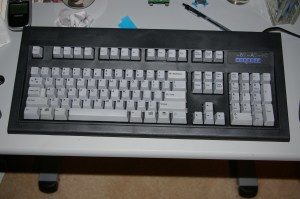
But today I just unwrapped this great thing.  Course I am still in the enthralled stage, so take these comments with a grain of salt.  But just a grain, because I think this one is a keeper.  The IBM Model M keyboards were legendary and were patterned after the famous Selectric typewriters.  Well, you can get them on Ebay for some amount of money, but you can also buy brand new ones from Unicomp.  They call them their Customizer line, and they look, feel, and sound like the old IBM keyboard.  Apparently they purchased the design and rights and they produce keyboards that are almost identical to the old ones, with some features like USB cords to bring them up to the present day.  I don’t think they are as heavy as the old ones, and I do hear something rattling around inside (but hasn’t affected the working any – probably just a piece of plastic), but oh my gosh is this thing nice to type on.

unicomp keyboard

Yeah, it is noisy, but not as loud as the Matias.  And the action on this thing is just great.  No bottoming out and just the right amount of push-back to make typing pleasurable.  And the keys are set like the old Selectric with the banks measurably higher than each other so your fingers don’t have to travel as far and you are far less prone to making mistakes.  But it isn’t pretty.  It is black with beige keys and is just functional looking.  So outward design took a back seat on this one.  But design of the key mechanism obviously ranked high, as did the durability for which the Model M was famous (we’ll see if this replica stands the test of time).

So design, of a type, was emphasized here, and so was functionality.  So we can have both?  Yes.  But it will cost you.  These aren’t cheap at about $70 to $90 bucks, but at least they are made in the US (I don’t mind foreign goods, just poorly made foreign goods) and will likely last for a good long time.  And I don’t mind spending the money if the quality is there.  Is this the best keyboard out there?  Not sure, but its the best of the ones I have, by a long shot.  And at the moment I am quite happy.

What do you think is the best keyboard out there, past or present?  Drop us a comment.

Scale and Smart Birds

This is a little off-topic, but take a look at this link: http://learn.genetics.utah.edu/content/begin/cells/scale/ A visual way to understand scale and the size of small things without having to use analogies.


Since I’m already off topic, here is another thing that I came upon that is quite amazing:   I had heard about Caledonia crows before, where they use the road and cars to crack nuts, but these rooks are creepy smart.  Tool-using and a bit of Archimedes in there as well.

Don’t be such an Engineer?

I just finished reading Dr. Randy Olson’s Don’t be Such a Scientist.  It is a good read and I think one that most scientists and engineers need to read, but I am not sure how to use it.

Olson’s underlying premise is that communicating science needs more than accurate facts dispensed in a confused flurry of powerpoint slides or in a formulaic technical paper.  Rather that scientists need to take a page from Hollywood’s book and appeal more to the heart or gut of their audience.  He advocates a mantra of arouse and fulfill, meaning that you need to first interest your audience and then fulfill that interest with your information.

The issue is the way scientists and engineers think makes it difficult for them to do the arousal bit.  This leads to his main topics: Don’t be so cerebral; Don’t be so liberal minded, Don’t be such a poor storyteller; Don’t be so unlikable; and Be the voice of Science.  These chapters are filled with good observations from his life that is half in the academic world and half in the world of film making in Hollywood.  His anecdotes are illustrative and interesting, and many of the examples he gives from science gatherings are easily seen also at many engineering conferences I have attended: presentations that are unfocused, boring, and confusing.  Yet they possess good, accurate, and important information.  But what use is that if nobody is listening or remembering what was said?

As a film maker, Olson has come to conclusions about presenting science to the populace and he supports them by looking at films like An Inconvenient Truth and To Hot Not to Handle, another global warming film by the same producer, but one that was made with more substance than style, rather than Truth which was more style than substance.  Guess which made more money, affected the public more, and got Gore a Nobel?

I haven’t seen Olson’s movies, Flock of Dodos and Sizzle, but it is interesting to read about him making them and finally understanding that he needed to drop the scientist’s voice inside him (to some extent) and instead go for the heart and gut.  Naturally the scientists hated his Sizzle, but by all accounts most other people liked it.

I think the issue here is balance, and Olson talks about it when he advocates scientists being bilingual; one voice for the science audience, one for the public.  The trouble I see here is that he assumes that scientists and engineers are capable of learning that second language.  I don’t think most of us are.  I think that is why there aren’t many Carl Sagans or Neil Degrasse Tysons.  It is rare to be a good scientist or engineer AND a great communicator to the public.  The book is good at pointing out why scientists aren’t all that successful in communicating and stirring up interest in the public, but I don’t think it is very realistic in the idea that those scientists can change.

Case in point, in a recent interview by Skepticality, Olson himself seemed to slip into the scientist-speak and went on and on until my interest waned.  I think most of us in the technical world are a bit dyed in the wool and it is hard for us to learn to speak to people’s hearts or guts.  It is certainly hard for us to learn to do it well.  It wasn’t answered in the interview, but I think Swoopy’s comment about finding good communicators and teaching them science has merit.  At least to help out in the communication of science.

As for us engineers, I think it would be good to take some of Olson’s suggestions on the road and stir things up.  We should be telling good stories about our fields to help support the technical information.  We should think about other media and how to use it to get our message across.  And we should realize that we are humans and we need to lighten up a little bit.

But, of course, we still need to be technically right, complete, and valid.  Tough balance?

What do you think?

Great Things #1

Do you have that thing that you always come back to, that you never seem to tire of, that always seems to have hidden depths and complexities that await exploring, that just makes you feel good? No, I ‘m not talking about your spouse (but if you were thinking about yours, congratulations). And no, not your Ferrari 599 either (you lucky bastard). Nor your HP 15C. Okay, maybe the 15 comes close.

I know, this is totally subjective and the answers are as varied as we all are. But for me, at least most of the time, it is \LaTeX. No not the shiny black stuff worn by the nubile young things on the Internet (which isn’t too bad in itself… smooth curves catching the light just so, hints of smooth…) sorry, seemed to have drifted off there for a second. Where was I? Oh, yeah, \LaTeX. The document preparation system. (Pronounced lah-tech or lay-tech).

\LaTeX is essentially a set of macros sitting on top of the venerable typesetting system, \TeX, invented by that computer master, Donald E. Knuth. No, it isn’t a word processor, and it shows its age by being almost GUI-free, but it is the thing to use to produce documents you can be proud of. All with a simple text editor and some markup commands that can be simple enough for a school child or complicated enough to keep the most nerdy of PhDs happy for years.

I’ve prepared three books and many papers and reports with \LaTeX and it was a pleasure to use and produced beautiful documents with little need for me to fiddle with margins, headers, page and section breaks, tables of contents, indexes, citations, etc., since most of these jobs are done automatically. You can, of course, customize the document to the nth degree, but most of the time the default settings are fine. And all the time you know what the program is doing, unlike M$ Word which I have to say drives me crazy.

And all you need is a decent text editing program and you’re in business. You’re source file is in plain old ASCII which means you can edit the file on virtually any computer and compile it there too–and get the same output whether you happen to be using a PC, a Mac, Linux, or pretty much any other system. And no worries about corrupted files. The source file isn’t touched during compilation, and when was the last time your text editor screwed up your ASCII file? Probably never.

Yes, the learning curve for \LaTeX can be steep–depending on what you’re trying to do–but it is so satisfying to learn and use. Especially compared to that pinacle of mediocrity that is Word. Better words than I can write about that comparison can be found here:

http://ricardo.ecn.wfu.edu/~cottrell/wp.html

And the following link discusses the beauty of \LaTeX:

http://nitens.org/taraborelli/latex

And I almost forgot one feature that stands above most others, the ability to typeset beautiful equations.  Though I gather the M$ equation editor is getting better, imagine just being able to write something like this:

\int_{0}^{1} x dx = \left[ \frac{1}{2}x^2 \right]_{0}^{1}
= \frac{1}{2}

and get something like this:

\int_{0}^{1} x dx = \left[ \frac{1}{2}x^2 \right]_{0}^{1} =\frac{1}{2}

or this:

\gamma \equiv \frac{1}{\sqrt{1 - v^2/c^2}}

and get this:

\Large{\gamma \equiv \frac{1}{\sqrt{1 - v^2/c^2}}}

Even WordPress here and WikiPedia use \LaTeX for formula setting.  So much easier than futzing with the M$ equation editor.

Am I being archaic and anachronistic? Sure. But it is better, a better way, and just more satisfying than almost any other thing on my computer. As a matter of fact, \LaTeX and R (see previous post) are the only things I need on my computer. Okay, a browser too. With these I can do anything I want. And all for free, I might add, though I do support the users group (www.tug.org) and its talented membership who make all this possible. I’d much rather give them my money rather than Micro$oft. I think they have enough.

So if you’re up to a challenge, give it a try and let us know what you think.

Does it make sense?

As in Science, and in Life, critical thinking is a vital part of an engineer’s mental toolbox. One basic tenet of critical thinking for an engineer is the simple question, does this make sense?

This question can be applied to almost any situation, idea, solution, or information. It is particularly useful (and necessary) when reviewing others’ computer generated or assisted calculations. More times than I care to remember have I been handed final reports that have gone through a checking process and look great, but which contain errors that I’ve spotted immediately just by asking that question. Yes, sometimes it takes years in the job to be able to spot those things quickly, but even if you don’t have the instinct of the numbers yet, a few minutes with a scratch pad and calculator will go a long way to answering the question.

Even some quick Nuke-math (as some call it in the Navy) done in your head can often uncover, or verify, whether the answer is in the right order of magnitude or if it is the right sign or direction, or if the units are right (or if the formulas will produce the units shown in the answer), or if the initial assumptions are reasonable, or if they included all the factors and variables in the calculations.

I remember one particularly egregious case where a report was submitted with no indication of anything wrong but which indicated that the ship had negative stability and should have been floating upside down at the pier if the report had been right. Here they never asked the question when they saw the negative number and the didn’t understand the significance of that number being negative. A fail on both accounts.

So keep asking that question—no matter how the information is presented or who gave it to you. And don’t stop when you leave the office. Does that total at the grocery store or restaurant make sense? Or the claims of that infomercial? Or the latest idea from that politician?

One simple question and a modicum of common sense can do great things.

What do you think? Post a comment below if you’ve got something to say.